UX Writing Standards
Built a shared writing standard for a team that had none, and cut stakeholder callouts on copy by 40 to 50%.
Design Systems
Content Strategy
At a Glance
Product: iMocha, Skills Intelligence and Hiring Platform
Role: Sole owner. I initiated this project and drove it independently, with support from my lead designer.
Scope: Microcopy standards for tooltips, buttons, headers, empty states, errors, helper text, modals, and labels
Output: AI writing personality prompt, one-page printable reference guide, punctuation guidelines
The Problem
Our stakeholders and CTO kept pointing out the same thing in design reviews: the writing inside the product wasn't good enough. Tooltips were vague, CTAs were generic, and error messages didn't help anyone. This wasn't a one-time callout. It came up in nearly every review.
The root cause was structural. Our design team had three members, and none of us had UX writing experience. Our technical writer sat in the marketing team and wasn't embedded with us, so we couldn't rely on her for every deliverable. Five different people were writing product copy in five different ways, and it showed.
I raised this with my lead designer. He agreed it was worth fixing, so I took it on.
What the Team Told Me
Before writing any guidelines, I talked to the designers, content writers, and PMs on the team. I wanted to know what they were actually struggling with, not what I assumed the problems were.
Six pain points kept coming up:
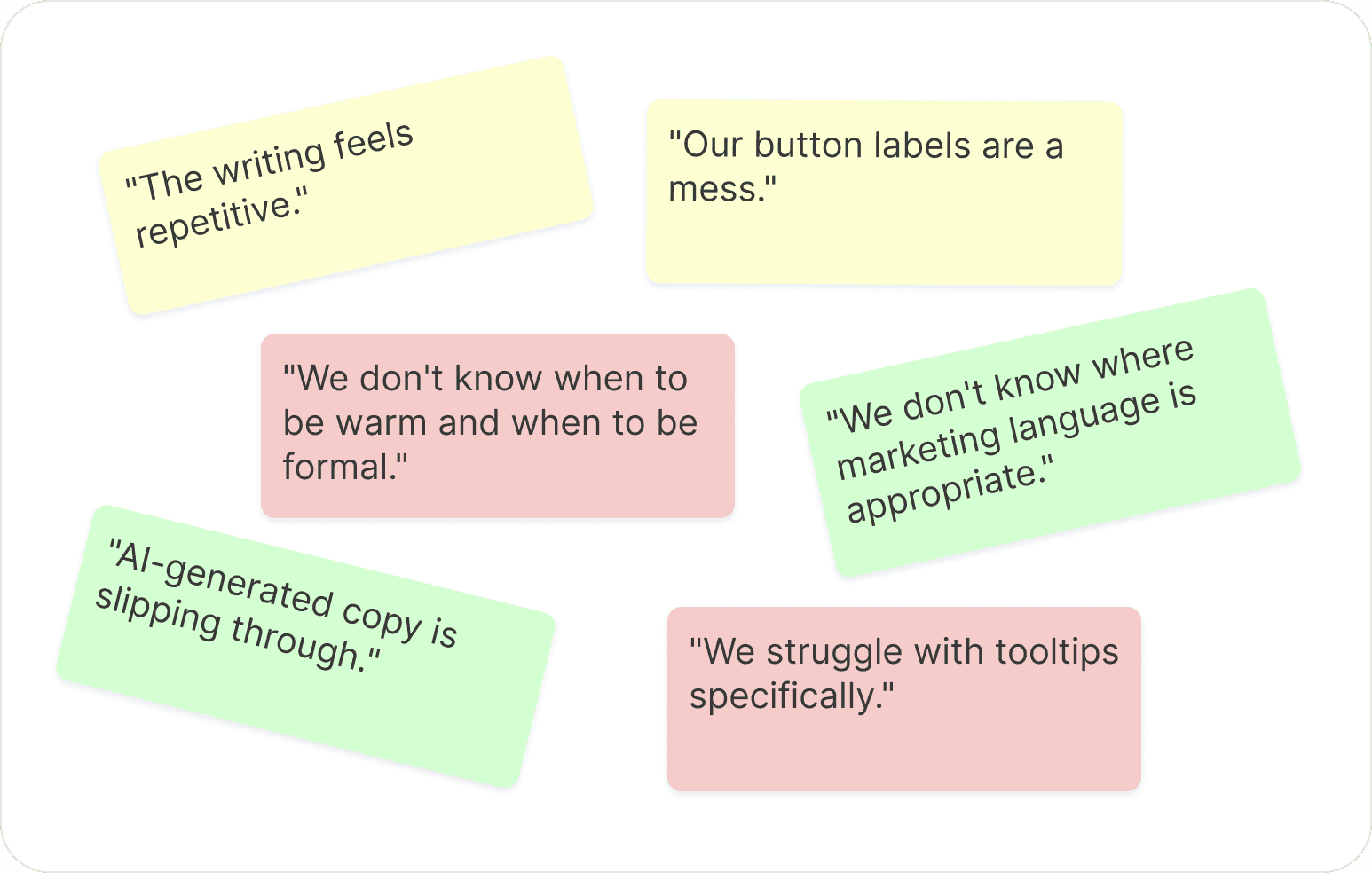
Every section of the final guidelines maps to one of these pain points.
What I Found in the Product
I audited six actual product screens. This turned out to be the most useful part of the entire project because it grounded every rule in something we had actually shipped, not hypothetical writing mistakes.
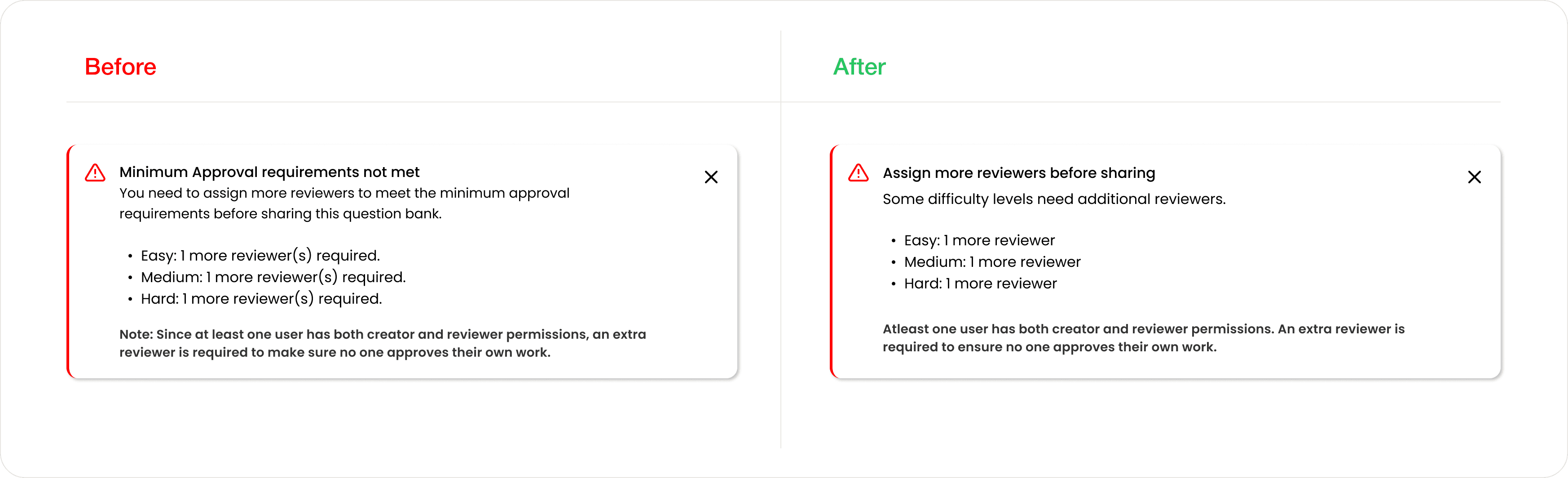
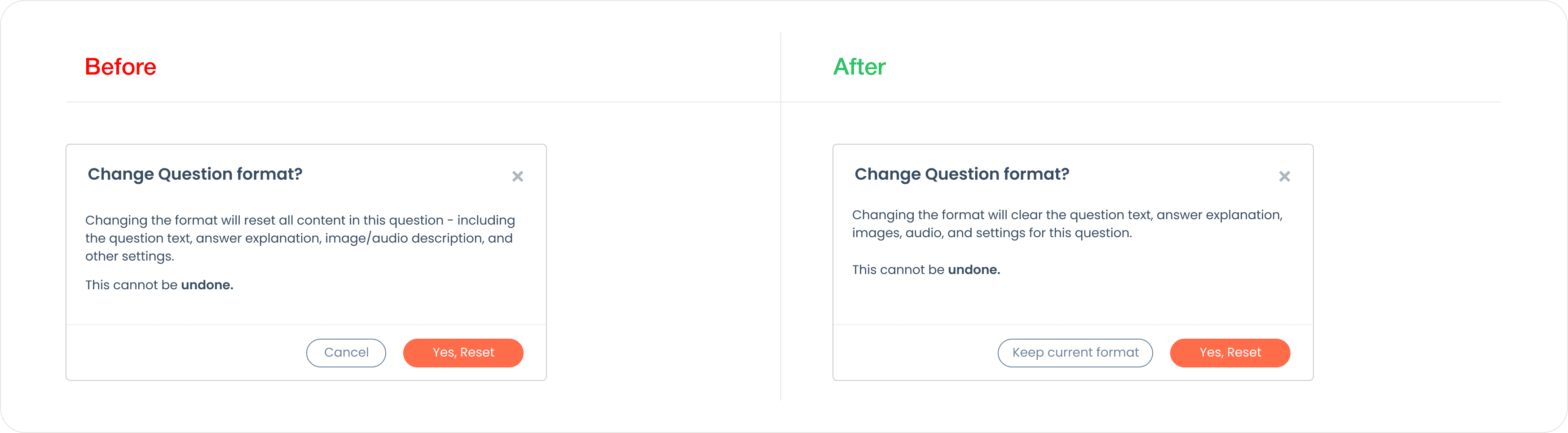
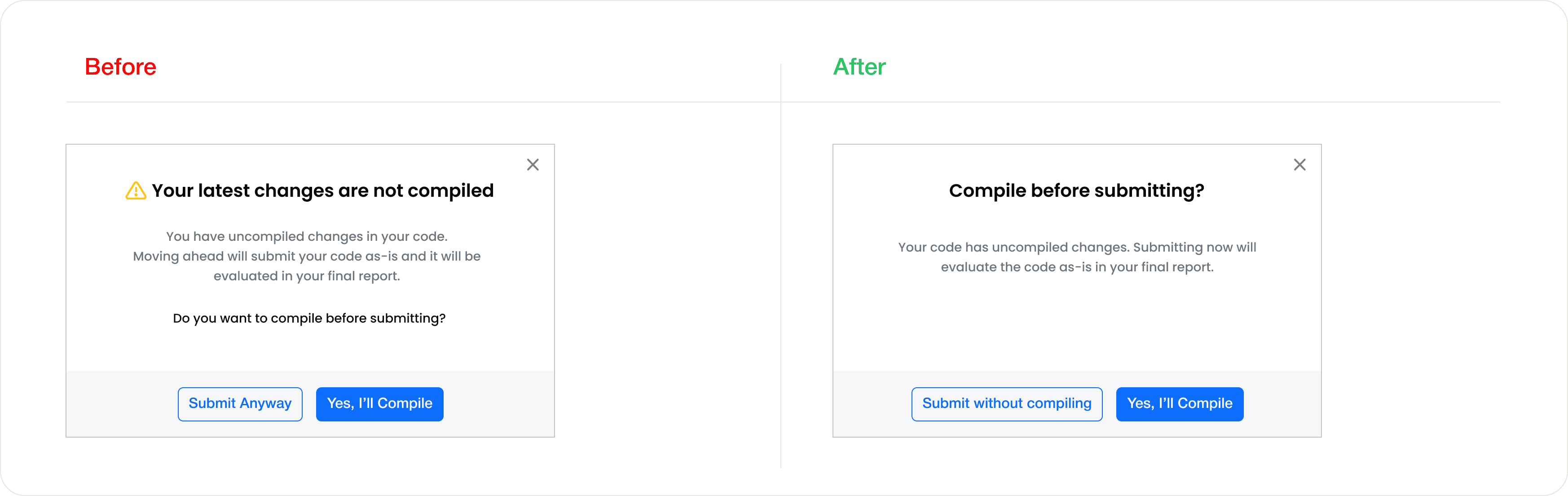
Tooltips restated labels. The "Requisition ID" tooltip said "The ID for this requisition," which tells the user nothing new. The fix: "Use this to reference the role in reports or your ATS."
Empty states were dead ends. "No Records" appeared in a table with no context and no next step. "No Skill Classification(s) Found" used developer-style copy with an (s) plural. The fix: tell users what to do. "No candidates yet. Add candidates or share your job link."
Developer language had shipped. "Bulk Action(s)" as a button label. "In Process/Failed Resumes" as a tab. "Set the figs" was an apparent placeholder that never got replaced before shipping.
Subtext repeated headers. The "Add Skills" step had a subheader that said "Add Skills" and body text immediately below that said "Add skills manually or generate them using AI." Three repetitions of the same instruction on one screen.
One piece of copy was working exactly right. The Recommendation panel said: "Not seeing enough strong matches? Recalibrate the skills in Step 2 to refine recommendations." It names a problem the user is likely having, tells them what to do, and tells them where to do it. This became the target standard for everything else.
The AI Slop Problem
Part of the brief was making the product sound human, not AI-generated. I used Charlie Guo's Field Guide to AI Slop to identify the specific patterns that make copy feel fake, and turned each one into a named anti-pattern in the guidelines with a product-specific example:
Drama dashes: "Your pipeline is empty, but it doesn't have to be!"
Triads: "Fast. Powerful. Human."
Filler openers: "In today's fast-paced hiring landscape..."
Performed profundity: "It's not just hiring, it's building a team."
The rule is simple: if you spot any of these patterns, rewrite before shipping.
What We Built
1. AI Writing Personality Prompt
A 3,000-word system prompt that defines an AI assistant as a senior UX writer on iMocha's team. The most important structural idea in the prompt is the three-lens model: before writing anything, the AI considers the request from three angles.

PM intent. What is this feature trying to accomplish?
Designer context. What component is this, what space does it sit in, and what's already been said on screen?
User moment. What mental state is this person in? A recruiter advancing a candidate to Offer is thinking differently than an HR admin configuring permissions.
Without this structure, an AI writes in a vacuum and produces copy that is grammatically correct but contextually wrong. The prompt also includes four user personas (recruiters, hiring managers, HR admins, candidates), rules for each microcopy surface, tone calibration (90% professional, 10% human), and a vocabulary reference.
2. A Reference Guide
A 3-page PDF with 28 rules across 7 sections, designed to be printed and pinned at a desk.
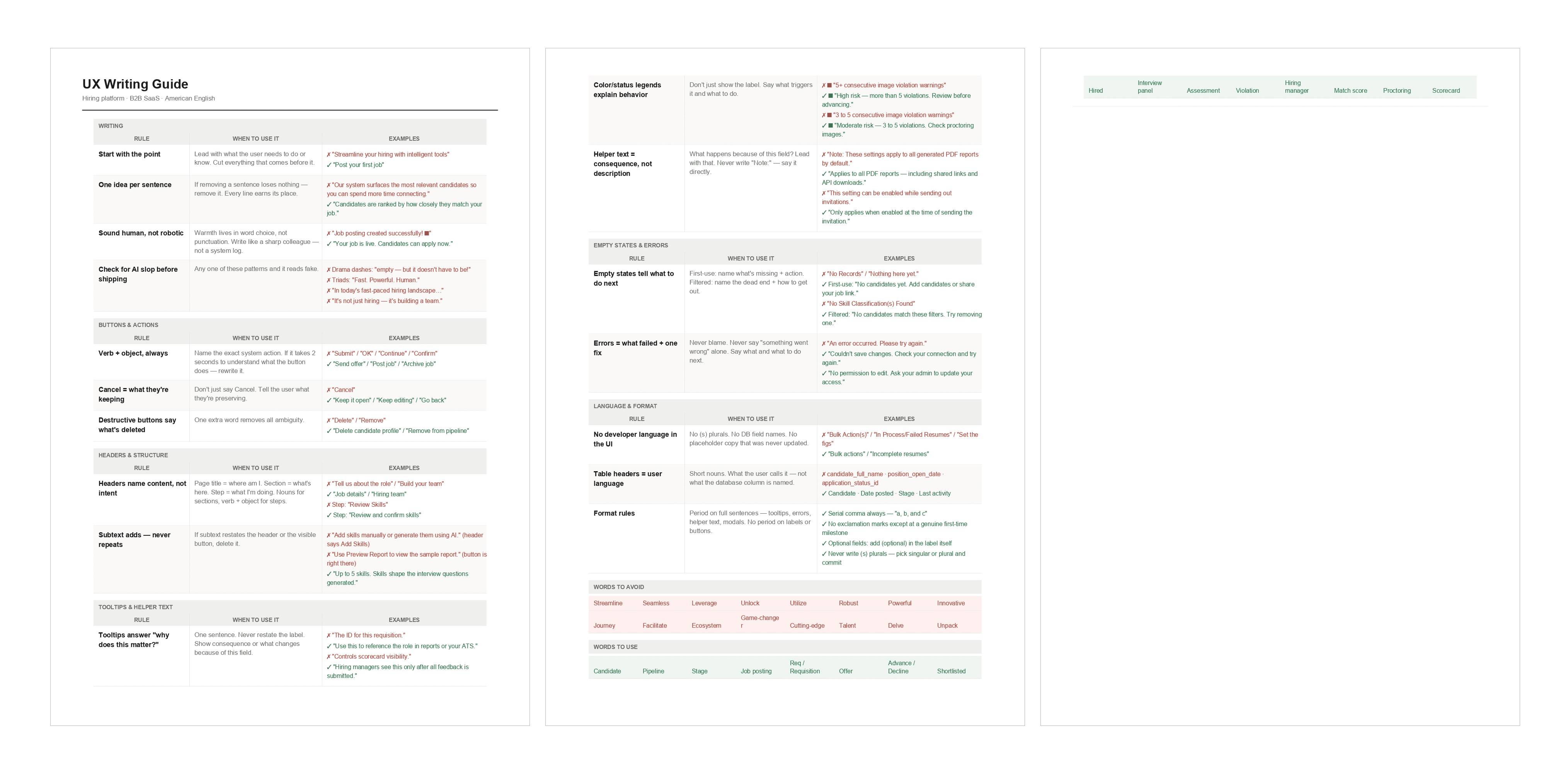
The original goal was to fit everything onto a single A4 page. Early drafts tried that, but 28 rules with examples at readable sizes didn't survive the compression. Body text at 6pt was at the edge of legibility, and cramming the bottom sections into a three-column layout made them harder to scan, not easier. We made the call to expand to three pages because a guide nobody can comfortably read is a guide nobody uses.
The final structure gives each section room to breathe. Every rule has three columns: the rule itself, why it matters, and a wrong/right example. The "why it matters" column was a deliberate choice. Rules without reasoning get followed once and then ignored. One sentence explaining the user consequence of getting a rule wrong is what makes it stick in daily work.
3. Punctuation Guidelines
I also created punctuation-specific references covering periods, commas, quotes, parentheses, hyphens, en dashes, and em dashes. Each one follows the same format: when to use it, when to avoid it, with product examples.
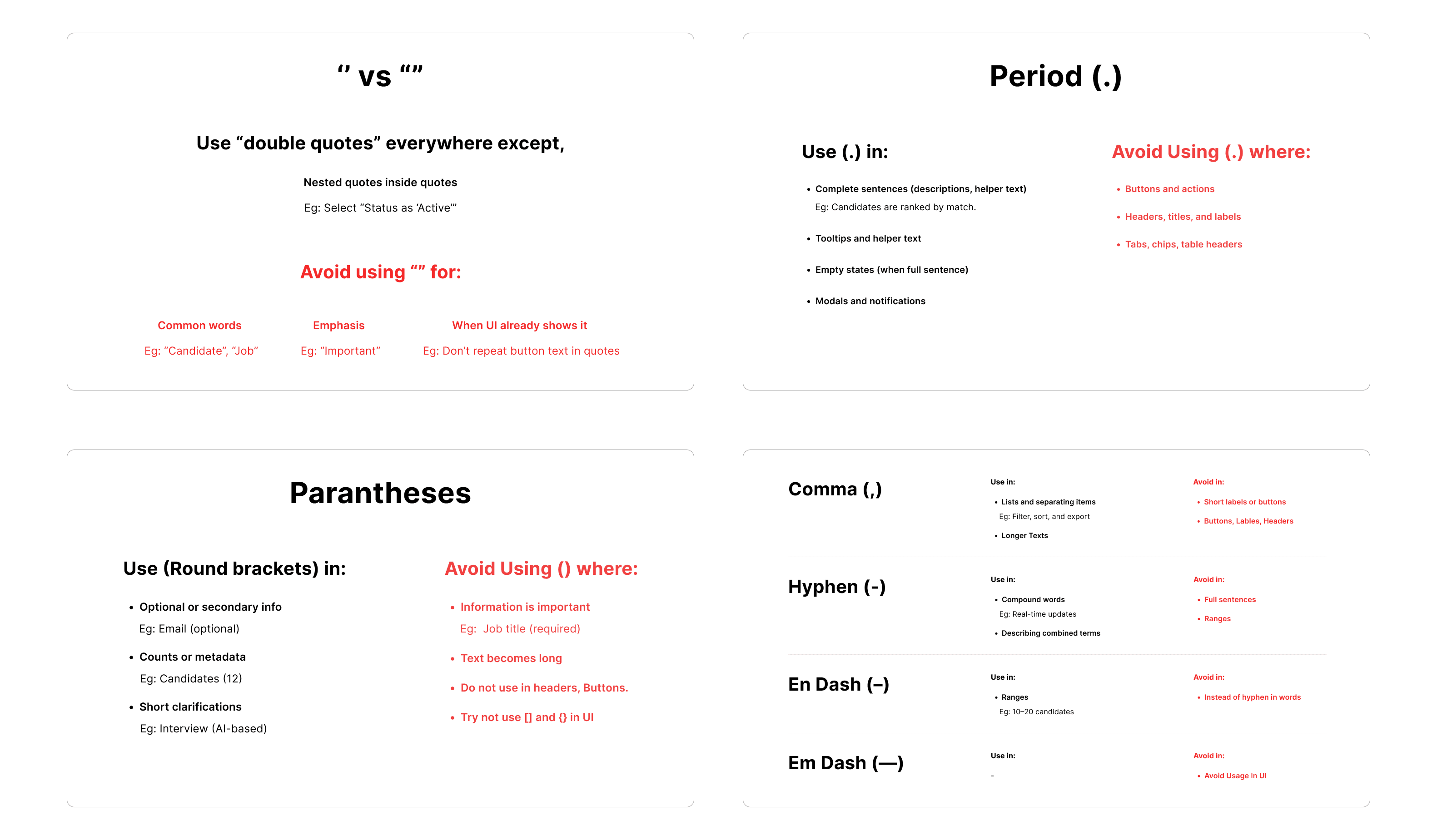
This came from a specific observation during the audit. The team wasn't only struggling with what to write, they were inconsistent on basic punctuation. Periods appearing on buttons, missing serial commas, straight quotes mixed with curly quotes. These are small things individually, but together they made the product feel unpolished.
Outcome
The guidelines were presented to stakeholders and adopted by the design and product teams. Since adoption, stakeholder callouts on UX writing have reduced by roughly 40 to 50%. The team now has a shared language for what good copy looks like, and a shared way to identify what's wrong when copy isn't working.
We're still iterating. The guidelines are a living document, and as new surfaces and features get built, the rules get pressure-tested and updated.
What This Project Taught Me
I didn't start this project to become a UX writing specialist. I started it to fix a recurring problem that was slowing down our design reviews. The work taught me that writing in a product is a design decision with the same weight as layout, hierarchy, or component choice. And that the biggest leverage isn't writing better copy yourself, it's building a system that helps an entire team write better copy consistently.